Zendesk Best Practice: Views
Zendesk Views: Keep It Lean Zendesk Views are simple until they're not. Learn how to structure your Views for cleaner queues, fewer missed tickets, and agents who actually know where to work.

TLDR:
- Keep views lean. Two to five active views per agent is the sweet spot, anything more and agents spend more time deciding where to work than actually working.
- One primary queue per agent. Whether that's group-based or personal depends on how your team assigns tickets, but the goal is one clear place to work from.
- Use SLAs to surface the right tickets first. They don't need to be customer-facing, they're just a reliable way to make sure urgent work gets picked up before it becomes a problem.
- Every ticket should have one home. For agents this is the goal, for admins and team leaders some overlap is inevitable for oversight.
- Build dynamic views, not one per group. Static per-team views don't scale, dynamic views built on conditions do.
- Reporting belongs in Explore, not a wall of views. If you're creating views just to count tickets, that's what Explore is for.
- Prune regularly. Stale views are quiet clutter that compounds over time.
Views are one of those things in Zendesk that seem simple until suddenly you're staring at fifteen of them and nobody can agree on which one to actually work from.
At their core, Views organise tickets into queues. They can be shared across all agents, scoped to specific groups, or kept personal. Simple enough. The problem is they're also really easy to over-engineer, and a bloated View setup is one of the fastest ways to quietly damage your team's performance.
Here's what actually works:
How many views does an agent actually need?
The sweet spot is somewhere between three and five active daily views per agent, plus one or two personal ones for regular edge cases. That's it.
Views are supposed to be focused work queues, the Zendesk equivalent of a to-do list. Once you've got fifteen of them, agents stop working and start deciding where to work. Tickets get missed. Everyone assumes someone else grabbed it.
When in doubt, if you're debating whether a view is needed, it probably isn't.
One primary queue (with a caveat)
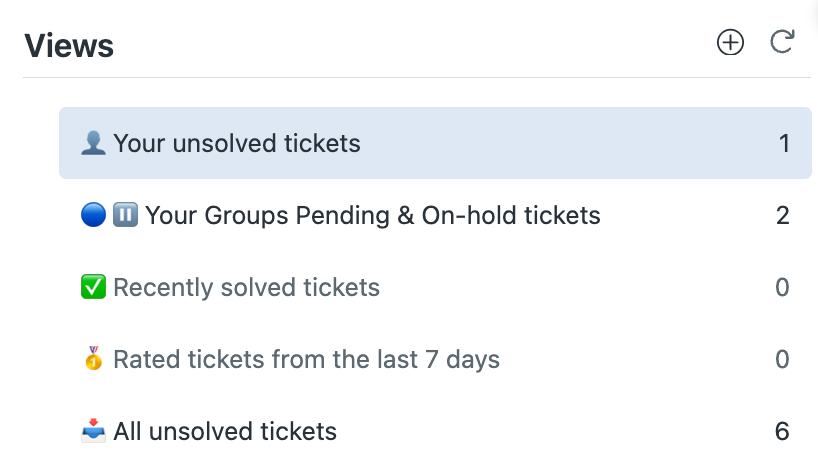
In an ideal world, every agent's default is a "My / My Groups – Unsolved" style view, with everything else like recently solved, pending, and recently rated sitting as supporting context rather than a primary workspace.
The caveat is that plenty of teams operate with team leaders who assign tickets directly to agents, which means agents are effectively working out of their personal "My Unsolved" queue only. That's fine and it works well when assignment is managed actively. The principle still holds though, which is that agents shouldn't need to juggle multiple primary queues. Whether the queue is group-based or personal, the goal is one clear place to work from.
I've seen setups with six overlapping primary queues for different ticket types, brands, channels, and priorities. Agents bounce between them, tickets stall, and the whole thing slows down in a way that's genuinely hard to trace back to the actual cause.
Use SLAs to make sure the right tickets come first
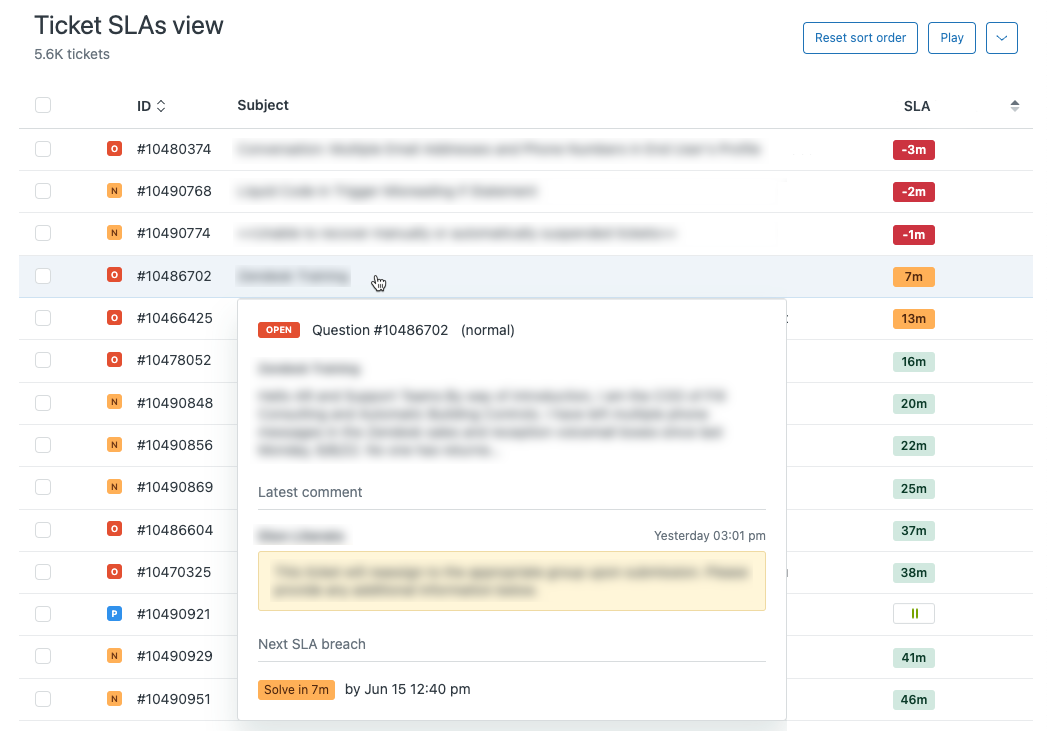
This is one of the areas where I see the most missed opportunity in Zendesk setups.
A printer on fire ticket should be getting picked up faster than a general marketing request. That sounds obvious, but without SLAs configured correctly your queue has no real way to enforce that. Agents just work top to bottom, and whatever got updated most recently floats to the surface, which often has nothing to do with urgency.
SLAs in Zendesk let you define targets for different ticket types and priorities. Pair that with sorting your operational queues by SLA breach time ascending, and tickets closest to breaching sit at the top. Agents aren't relying on gut feel or waiting for someone to escalate. The queue does the thinking for them.
A lot of organisations shy away from SLAs because they assume it means publishing response time commitments to customers or reporting up to leadership. It doesn't have to. SLAs can function as a purely internal tool for keeping certain ticket types moving. A background mechanism that ensures your high priority work gets actioned before it becomes someone's bad day.
There's also a less obvious benefit. Agents genuinely respond well to the satisfaction of keeping tickets from breaching. It adds a small, clear sense of progress to the work that a flat unstructured queue doesn't give you.
Design your views so tickets have one home
A ticket should ideally live in one queue. Not two, not "well it depends." One.
When tickets show up across multiple views, agents either double-handle them or quietly assume someone else has it covered. Neither ends well.
That said, this is more of a principle to design toward than a hard rule you can always enforce. For agents it's the goal. For team leaders and admins the reality is often different. Oversight sometimes requires views that overlap, whether that's a catch-all "All Unsolved" view to spot misrouted tickets, or group-level views that give leads visibility across their whole team. That's fine and expected at that level. The key is being intentional about it rather than letting overlap creep into agent-facing views where it creates confusion.
Dynamic views over a static one-per-group approach
It's tempting to build a dedicated view for every team. Group A View. Group B View. Tier 2 Escalations View. These don't scale. When conditions shift, tickets get orphaned and teams assume the other group's view covers them.
Use Explore for reporting, not a wall of views
The most common form of view sprawl is a separate view for every team and group combination so someone can count tickets per queue. The result is near-duplicate views, inconsistent usage, and a setup nobody maintains.
For ticket distribution, workload patterns, or trend data, that's what Zendesk Explore is for. Views are operational tools, not dashboards.
The small stuff that compounds
A few things that individually seem minor but add up across hundreds of tickets and a busy team:
- Consistent columns across views. Agents shouldn't have to reorient every time they switch queues. Standardise column order and only vary it where the workflow genuinely demands it.
- Clear naming conventions. Emoji prefixes can actually work well for quick visual scanning, and using Zendesk's Category::View name folder structure keeps things grouped logically. Agents shouldn't need to scroll and hunt.
- Restrict views to the right audiences. Admin and lead views should be separate from agent views. Sidebar clutter is a slow, invisible tax on everyone's attention.
- Delete stale views. If nobody has used it in three months, deactivate it. "Just in case" views are the weeds that make the whole garden hard to navigate.
The underlying point
Good view design is really just about removing unnecessary decisions from your agents' workflow so they can focus on customers.
Every extra view, every ambiguous queue, every missing SLA column compounds. Get the structure right, keep it lean, and your Views become the kind of infrastructure that's invisible because it just works.